


Aurora Now - Northern Lights
4.447.00 Reviews
App Specs
- Version
- 1.8.1
- Updated On
- License
- Free
- Downloads
- 100,000+
- Developer
- VNIL AB
- Categories
- Weather
- Platform
- Android, iOS
Screenshots
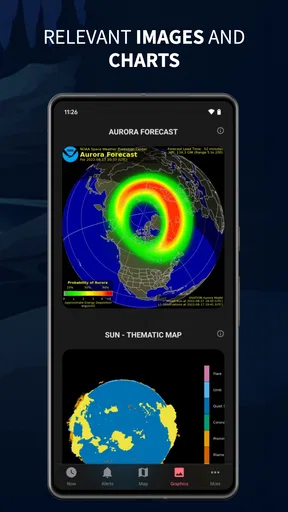
 Analysis by AppCompare
I find Aurora Now most useful when I treat it as a planning companion, not a promise that the sky will put on a show. Aurora viewing depends on more than activity forecasts: cloud cover, darkness, location, and the simple fact that nature does not follow a schedule all matter. The app’s appeal is that it brings aurora-focused information together in one place, so I can decide whether it is worth stepping outside or arranging a trip instead of relying on a vague hunch.
How I’d use it before heading out
For a trip, I’d check the forecast while choosing where to spend an evening, then use the information again closer to the time I plan to go out. That two-stage routine is more practical than treating an early forecast as fixed. A promising outlook can help me stay flexible, but I would still check local conditions and keep a backup plan, such as a warm indoor stop or another activity nearby.
At home, the app suits a different kind of use: a quick check when I hear that aurora activity may be interesting. It can help answer the first question—whether to pay attention tonight—without turning every evening into a long monitoring session. I would keep expectations measured, though. A forecast can guide when and where to look; it cannot guarantee that the lights will be visible from my exact spot.
Useful decisions, not just interesting information
The practical value is in connecting a forecast to a real decision. If I have limited time, I can use the information to decide whether to travel farther from bright surroundings, wait for a clearer spell, or call it a night. I would avoid making a costly or exhausting journey based on one alert alone. Checking conditions again before leaving is a sensible safeguard, especially when the viewing window matters.
That also shapes who I think will get the most from it. Aurora enthusiasts, travelers who are already planning time in northern regions, and curious beginners who want a focused way to follow the phenomenon are the natural audience. If I only want a general forecast for rain, temperature, or my daily commute, a conventional weather app is likely the more useful default. Aurora Now is best understood as a specialist tool alongside ordinary weather information, rather than a replacement for it.
Forecasts need context
One trade-off with any aurora forecast is that a clear, readable activity indicator can feel more definite than the sky really is. I would use the app to narrow down when to pay attention, then judge the situation outdoors rather than assuming a high-looking signal means a bright display is assured. Clouds can spoil an otherwise promising night, while local light pollution can make a faint aurora harder to notice. Those are reasons to combine the app’s guidance with common sense, not reasons to dismiss it.
I would also avoid leaving alerts to make every decision for me. Notifications are handy when I am busy, but a quiet night should not be mistaken for a guarantee that nothing could change, and an alert is a prompt to check rather than an instruction to set out immediately. For a planned viewing session, I’d decide in advance how far I am willing to travel and how late I want to stay out. That simple limit keeps the chase enjoyable instead of letting the forecast take over the evening.
Worth Reading Before You Choose

EA SPORTS FC Mobile 26 Is a Bigger Football Game, but It Takes Time

Flipboard Shows What News Apps Must Do Beyond the Feed

Switching to Android Auto Means Rethinking Your Driving Routine

Google Calendar Makes a Crowded Week Easier to Manage

Ludo King Makes the Most of the Minutes Between Plans

Baby Panda World Brings Quick Play to Modern Phones, but Its Game Library Feels Busy
Speed, stability, and everyday expectations
A weather-and-forecast app is most useful when it gets me to the relevant information without fuss. My first impression here was that getting started felt straightforward, and the interface was easy to approach. I would not confuse that initial ease with a guarantee about performance in every situation, though. When checking conditions outdoors, a weak connection or a cold, low battery can affect the phone experience regardless of the app. I’d look at the forecast before leaving home and avoid depending on a last-minute refresh as my only plan.
Heavy use is likely to mean checking several times as the evening develops, especially if I am comparing a promising forecast with changing local weather. That is a reasonable way to use a specialist app, but it can also encourage unnecessary screen time while the better move may be to look at the sky. I’d check at a few decision points—before setting out, near the planned viewing time, and if conditions change—rather than repeatedly refreshing without a clear reason.
For reliability, I value an app that helps me make a better-informed choice, not one that claims certainty about a natural event. If a display does not appear, that does not by itself tell me whether the forecast was useless; visibility, timing, and the observer’s location all matter. I’d use Aurora Now as one input and keep a standard weather forecast in the mix for practical local conditions. That division of jobs makes the experience more dependable than expecting one aurora-focused tool to answer every weather question.
Cost, compatibility, and who should pass
Aurora Now is a free weather app from VNIL AB, with optional in-app purchases ranging from $1.99 to $9.99 per item. I like being able to start without paying, but I would check what an optional purchase adds before deciding it is worthwhile. A casual user who only checks occasionally may have no reason to spend; someone who follows aurora activity closely can decide whether the paid extras match their own routine. Its Everyone age rating also makes it broadly suitable for general audiences.
The app was released on January 11, 2024, and its current version is 1.7.2. It requires Android 7.0 or later, a useful detail to check before installing on an older device. Its average rating is 4.4 from around 1.4 thousand ratings, and it has passed 100 thousand installs. Those figures suggest that it has found an audience, but they should not substitute for deciding whether an aurora-specific forecast is something I will actually use.
I would skip it if I need a single all-purpose weather dashboard, rarely have a chance to see the Northern Lights, or expect an app to guarantee a sighting. I’d also be cautious about building a tight travel itinerary around forecasts alone. For someone who enjoys following auroras and can stay flexible, though, it gives a focused reason to check the sky and a practical starting point for planning.
Have you ever found yourself captivated by the mystical dance of the Northern Lights? Well, if you're anything like me, you're probably fascinated by this natural spectacle. That's where Aurora Now comes in, a nifty little app that promises to bring the magic of the Aurora Borealis right to your phone.
Getting Started with Aurora Now
When I first stumbled upon Aurora Now, I was curious about how an app could replicate such a mesmerizing experience. So, naturally, I downloaded it to see what all the fuss was about. The installation was a breeze, and soon, I was greeted with a sleek interface that seemed both inviting and user-friendly.
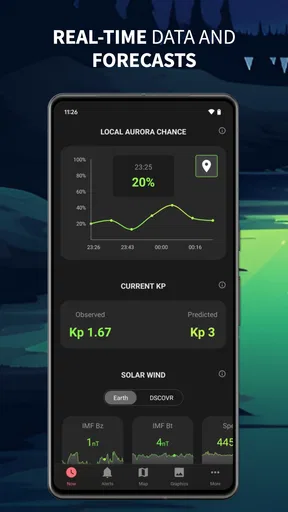
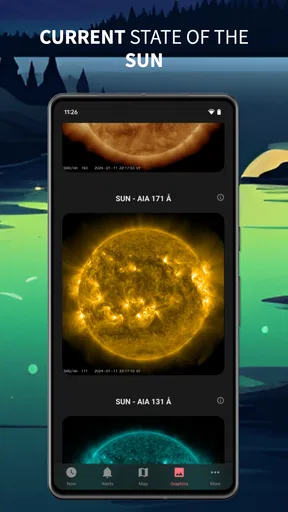
The app essentially serves as your personal Northern Lights forecast station. It's perfect for anyone planning a trip to the Arctic regions or just someone who appreciates the beauty of the auroras from afar. With real-time data and detailed forecasts, it's like having a mini meteorological lab in your pocket.
Features That Shine
Let’s dive into some of the standout features that make Aurora Now a must-have for any aurora enthusiast.
- Real-time Alerts
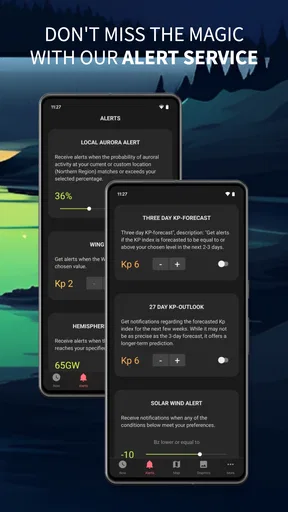
- Never miss a chance to witness the auroras with the app’s real-time alerts. You can customize notifications to alert you based on your location and aurora activity levels.
- Interactive Maps
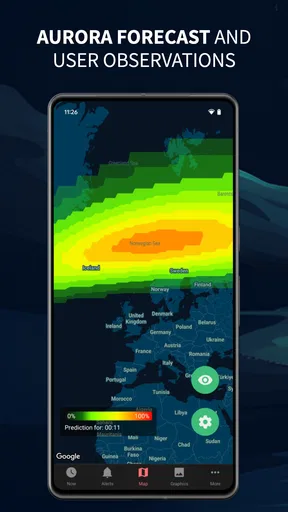
- The interactive map feature is a game-changer. It shows you exactly where and when the auroras are likely to appear, helping you plan your viewing experience down to the minute.
- Weather Integration
- No more second-guessing the weather! The app integrates weather forecasts to ensure visibility conditions are just right for aurora watching.
User Experience
My experience with the app was pretty seamless. The user interface is intuitive, with everything you need just a tap away. It’s pretty clear the developers put a lot of thought into the design, making it accessible even for those who aren't tech-savvy. The color-coded index and graphs make it easy to understand the aurora activity levels at a glance.
One thing I particularly enjoyed was the "Aurora Gallery" section. It features stunning images and videos of past aurora events captured by users worldwide. It’s a great way to feel part of a global community of aurora chasers.
Does It Deliver?
Now, let's talk about the most important question: does Aurora Now deliver on its promises? In my experience, it certainly does. The app provides accurate forecasts and alerts, which are crucial for anyone hoping to catch a glimpse of the elusive Northern Lights.
"The magic of the auroras, now in the palm of your hand!"
With its comprehensive features and easy navigation, Aurora Now is a fantastic tool for both seasoned aurora hunters and newbies alike. It’s not just an app; it's an experience that brings the enchanting world of the Northern Lights closer to you.
So, if you’re dreaming of chasing the auroras or simply want to stay informed, give Aurora Now a try. It's an app that makes the skies a little more magical and the world a bit more connected through the shared wonder of the Northern Lights. Happy aurora hunting!
Pros
- Stunning real-time aurora forecasts.
- User-friendly interface with easy navigation.
- Customizable notifications for aurora alerts.
- Supports multiple languages for global users.
- Detailed guides for aurora viewing tips.
Cons
- Requires premium for some advanced features.
- Occasional inaccuracies in forecast data.
- Limited offline functionality.
- Advertisements can be intrusive.
- Battery consumption is relatively high.
FAQs for Aurora Now - Northern Lights
What features does Aurora Now offer to enhance the Northern Lights experience?
Aurora Now provides real-time alerts and forecasts for Northern Lights activity, allowing users to know the best times to catch the aurora. The app includes an intuitive map feature showing aurora visibility regions and detailed weather conditions. Users can also access a community forum to share experiences and tips.
Is Aurora Now user-friendly for beginners who want to learn about the Northern Lights?
Yes, Aurora Now is designed with beginners in mind. It offers a simple, user-friendly interface with easy navigation. The app includes educational resources explaining aurora phenomena, tips for viewing, and a step-by-step guide to using the app’s features effectively, making it ideal for newcomers.
Does Aurora Now require a constant internet connection to function?
While Aurora Now performs best with an internet connection for real-time updates, it does offer offline capabilities. Users can download forecasts and access saved data without a connection, making it a reliable tool for remote locations where internet access may be limited.
How accurate are the aurora forecasts provided by Aurora Now?
Aurora Now utilizes data from reputable sources like NOAA and advanced algorithms to provide highly accurate forecasts. While no prediction can be perfect due to the dynamic nature of the aurora, the app is well-regarded for its reliability and precision in forecasting visibility and intensity.
Is there a cost associated with using Aurora Now, and are there in-app purchases?
Aurora Now is available as a free download, offering basic features at no charge. However, it provides a premium version through in-app purchases, which unlocks additional features such as extended forecasts, ad-free usage, and enhanced map functionalities, offering a more comprehensive experience.


